零js基礎 | 程序設計 | 8 - BOM

BOM核心
控制窗口、框架和弹出窗口
利用location 对象中的页面信息
使用navigator对象了解浏览器;

全局变量不能通过delete 操作符删除,而直接在window 对象上的定义的属性可以

var age = 29;
window.color = "red";
//在IE < 9 时抛出错误,在其他所有浏览器中都返回false
delete window.age;
//在IE < 9 时抛出错误,在其他所有浏览器中都返回true
delete window.color; //returns true
alert(window.age); //29
alert(window.color); //undefined
//这里会抛出错误,因为oldValue 未定义
var newValue = oldValue;
//这里不会抛出错误,因为这是一次属性查询
//newValue 的值是undefined
var newValue = window.oldValue;

window.frames[0]或者window.frames["topFrame"]来引用上方的框架。不过,恐怕你最好使用
top 而非window 来引用这些框架(例如,通过top.frames[0])
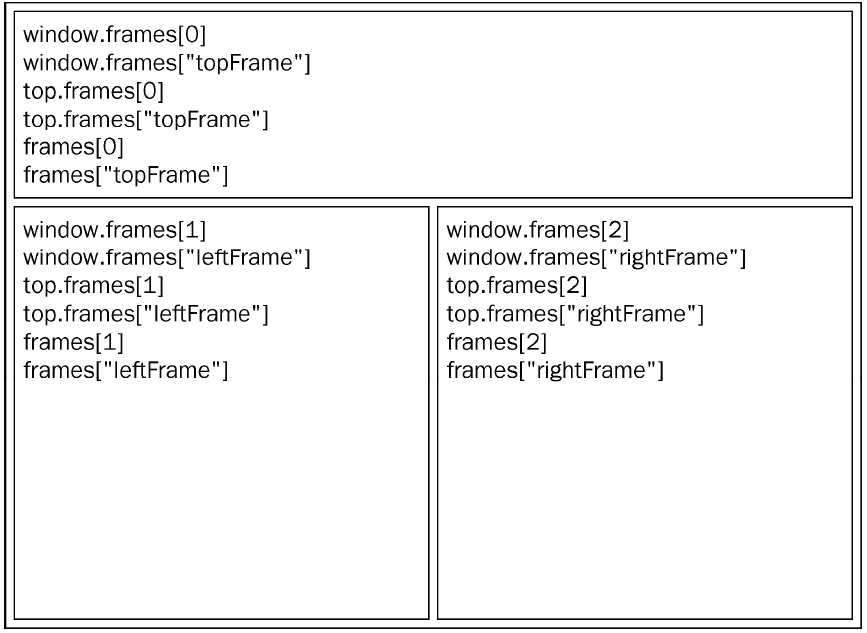

与top 相对的另一个window 对象是parent。顾名思义,parent(父)对象始终指向当前框架的
直接上层框架。在某些情况下,parent 有可能等于top;但在没有框架的情况下,parent 一定等于
top(此时它们都等于window)。

ff支持 screenX 和screenY

    var leftPos = (typeof window.screenLeft == 'number') ?
        window.screenLeft : window.screenX;
    var topPos = (typeof window.screenTop == 'number') ?
        window.screenTop : window.screenY;
//将窗口移动到屏幕左上角
window.moveTo(0,0);
//将窗向下移动100 像素
window.moveBy(0,100);
//将窗口移动到(200,300)
window.moveTo(200,300);
//将窗口向左移动50 像素
window.moveBy(-50,0);

所有浏览器都有:innerWidth/innerHeight/outerWidth/outerHeight

IE9+/Safari/Firefox: outerWidth/outerHeight返回浏览器本身尺寸

Opera:outerWidth/outerHeight:表示单个标签页对应的浏览器窗口大小;而innerWidth/innerHeight表示该容器中页面视图的大小 - 边框宽度;

chrome:outerWidth/outerHeight与 innerWidth/innerHeight返回相同的值,即viewport大小而非浏览器窗口大小

var pageWidth = window.innerWidth,
    pageHeight = window.innerHeight;
if (typeof pageWidth != "number") {
    if (document.compatMode == "CSS1Compat") {
        pageWidth = document.documentElement.clientWidth;
        pageHeight = document.documentElement.clientHeight;
    } else {
        pageWidth = document.body.clientWidth;
        pageHeight = document.body.clientHeight;
    }
}

compatMode 检查是否处于标准模式;
使用resizeTo()和resizeBy()方法可以调整浏览器窗口的大小。这两个方法都接收两个
参数,其中resizeTo()接收浏览器窗口的新宽度和新高度,而resizeBy()接收新窗口与原窗口的宽
度和高度之差。来看下面的例子。
//调整到100×100
window.resizeTo(100, 100);
//调整到200×150
window.resizeBy(100, 50);
//调整到 300×300
window.resizeTo(300, 300);

window.open(要加载的URL,窗口目标,一个特性字条串,是否当前页面打开)
,所以


< a href="http://www.wrox.com" target="topFrame"></a> 
====
window.open("http://www.wrox.com/", "topFrame");

window.close()只适应于window.open()打开的窗口;弹出窗口打调用top.close();

创建的window 对象有一个opener 属性,其中保存着打开它的原始窗口对象


        var wroxWin = window.open('http://www.w.com','w','height=400,width=400,top:10,left=10,resizable = yes')
        console.log(wroxWin.opener = window) //true

chrome中设置opener属性为null,表示在单独进程中独立运行;

var wroxWin = window.open("http://www.wrox.com/","wroxWindow",
"height=400,width=400,top=10,left=10,resizable=yes");
wroxWin.opener = null;

检测是否被屏蔽弹出

        var blocked = false;
        try {
            var wroxWin = window.open("http://www.wrox.com", "_blank");
            if (wroxWin == null) {
                blocked = true;
            }
        } catch (ex) {
            blocked = true;
        }
        if (blocked) {
            alert("The popup was blocked!");
        }
        }

返回布尔值;

if (confirm("Are you sure?")) {
    alert("I'm so glad you're sure! ");
} else {
    alert("I'm sorry to hear you're not sure. ");
}

返回false或字符串

var result = prompt("What is your name? ", "");
if (result !== null) {
    alert("Welcome, " + result);
}

localtion对象

既是window对象,也是document对象;

window.location == document.location 引用同一个对象 ;
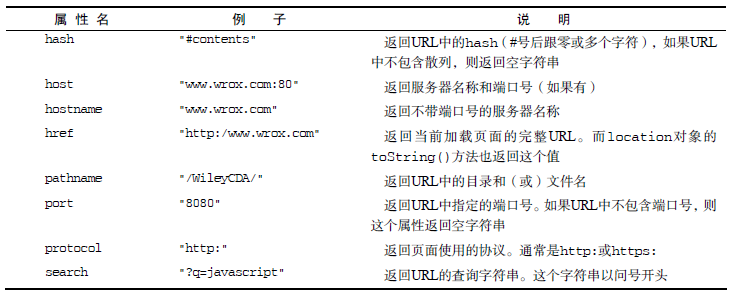
查询字符串参数

        function getQueryStringArgs() {
            //取得查询字符串并去掉开头的问号
            var qs = (location.search.length > 0 ? location.search.substring(1) : ""),
                //保存数据的对象
                args = {},
                //取得每一项
                items = qs.length ? qs.split("&") : [],
                item = null,
                name = null,
                value = null,
                //在for 循环中使用
                i = 0,
                len = items.length;
            //逐个将每一项添加到args 对象中
            for (i = 0; i < len; i++) {
                item = items[i].split("=");
                name = decodeURIComponent(item[0]);
                value = decodeURIComponent(item[1]);
                if (name.length) {
                    args[name] = value;
                }
            }
            return args;
        }

//假设查询字符串是?q=javascript&num=10
var args = getQueryStringArgs();
alert(args["q"]); //"javascript"
alert(args["num"]); //"10"

跳转新窗口:

          location.assign('http://www.baidu.com')
          window.location = 'http://www.baidu.com'
          location.href = 'http://www.baidu.com'
        //假设初始URL 为http://www.wrox.com/WileyCDA/
        //将URL 修改为"http://www.wrox.com/WileyCDA/#section1"
        location.hash = "#section1";
        //将URL 修改为"http://www.wrox.com/WileyCDA/?q=javascript"
        location.search = "?q=javascript";
        //将URL 修改为"http://www.yahoo.com/WileyCDA/"
        location.hostname = "www.yahoo.com";
        //将URL 修改为"http://www.yahoo.com/mydir/"
        location.pathname = "mydir";
        //将URL 修改为"http://www.yahoo.com:8080/WileyCDA/"
        location.port = 8080;

禁止返回后退页面

window.location.replace('http://baidu.com')

重新加载 reload()

location.reload(); //重新加载(有可能从缓存中加载)
location.reload(true); //重新加载(从服务器重新加载)

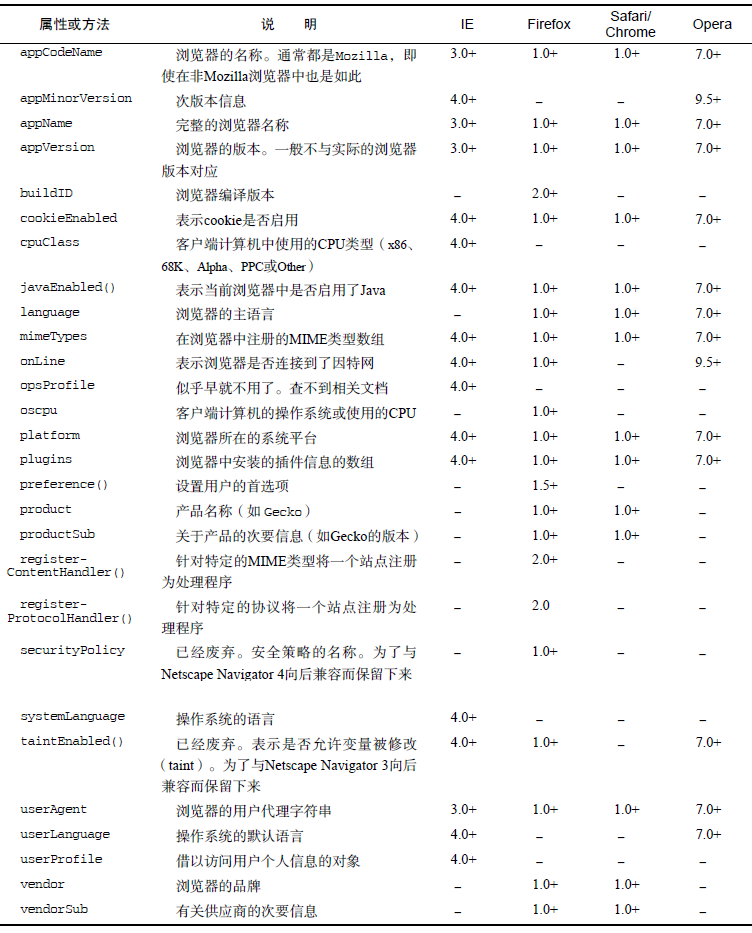
navigator
页面在IE7提示升级

if(window.ActiveXObject)
    {
        var browser=navigator.appName 
        var b_version=navigator.appVersion 
        var version=b_version.split(";"); 
        var trim_Version=version[1].replace(/[ ]/g,""); 
      if(browser=="Microsoft Internet Explorer" && trim_Version=="MSIE6.0"  || trim_Version=="MSIE7.0" ) 
        { 
        $(".ie7andie6").show();
        $(".contentnone").hide();
        } 
   }

跳到手机网站

 var a=navigator.userAgent;
if(a.indexOf("Android")!=-1 || a.indexOf("iPhone")!=-1 || a.indexOf("iPad")!=-1 ){

             //跳转到手机网站

    }

检测浏览器中是否安装了特定的插件是一种最常见的检测例程。对于非IE 浏览器,可以使用
plugins 数组来达到这个目的。该数组中的每一项都包含下列属性。
 name:插件的名字。
 description:插件的描述。
 filename:插件的文件名。
 length:插件所处理的MIME 类型数量。

    function hasPlugin(name) {
        name = name.toLowerCase();
        for (var i = 0; i < navigator.plugins.length; i++) {
            if (navigator.plugins[i].name.toLowerCase().indexOf(name) > -1) {
                return true;
            }
        }
        return false;
    }
    //检测Flash
    alert(hasPlugin("Flash"));
    //检测QuickTime
    alert(hasPlugin("QuickTime"));
}

这个hasPlugin()函数接受一个参数:要检测的插件名

IE插件专家

//检测IE 中的插件
function hasIEPlugin(name) {
    try {
        new ActiveXObject(name);
        return true;
    } catch (ex) {
        return false;
    }
}
//检测Flash
alert(hasIEPlugin("ShockwaveFlash.ShockwaveFlash"));
//检测QuickTime
alert(hasIEPlugin("QuickTime.QuickTime"));

推荐是下面的方法:

        //检测所有浏览器中的Flash
        function hasFlash() {
            var result = hasPlugin("Flash");
            if (!result) {
                result = hasIEPlugin("ShockwaveFlash.ShockwaveFlash");
            }

            return result;
        }
        //检测所有浏览器中的QuickTime
        function hasQuickTime() {
            var result = hasPlugin("QuickTime");
            if (!result) {
                result = hasIEPlugin("QuickTime.QuickTime");
            }
            return result;
        }
        //检测Flash
        alert(hasFlash());
        //检测QuickTime
        alert(hasQuickTime());

screen 对象

JavaScript 中有几个对象在编程中用处不大,而screen 对象就是其中之一。screen 对象基本上只
用来表明客户端的能力,其中包括浏览器窗口外部的显示器的信息,如像素宽度和高度等。每个浏览器
中的screen 对象都包含着各不相同的属性,下表列出了所有属性及支持相应属性的浏览器。

history 对象

//后退一页
history.go(-1);
//前进一页
history.go(1);
//前进两页
history.go(2);

//跳转到最近的wrox.com 页面
history.go("wrox.com");
//跳转到最近的nczonline.net 页面

history.back();
//前进一页
history.forward();

history 对象还有一个length 属性

if (history.length == 0){
//这应该是用户打开窗口后的第一个页面
}

虽然history 并不常用,但在创建自定义的“后退”和“前进”按钮,以及检测当前页面是不是
用户历史记录中的第一个页面时,还是必须使用它。

零js基礎 | 程序設計 | 7 - 函数表达式

name属性获取函数名:IE不支持

    function fn1(name, age) {}
    console.log(fn1.name) //fn1

创建了一个名为f()的命名函数表达式,然后将它赋值给变量factorial

        'use strict'  //兼容严格模式,arguments.callee()不支持严格模式;
        var fa = (function f(num) {
            if (num < 1) {
                return 1
            } else {
                return num * f(num - 1)
            }
        })
        var fac = fa
        fa = null
        fac(8)

闭包是指有权访问另一个函数作用域中的变量的函数

函数调用时,执行环境:1、,作用域链1--全局变量;2、作用域链2--compare()的活动对象argument,v1,v2

function comapre(v1,v2){
    if(v1<v2){return -1}
    else if(v1>v2){return 1}
    else{return 0;}
}
    var result = comapre(5,10) //调用时,创建一个包含 argument,v1,v2的活动对象;
compare()调用---》创建执行环境--》复制函数的[[Scope]]属性--》用来构建起执行环境的作用域链
--》此后,活动对象(arguments与参数)--》推入执行环境作用链前端
在compare()的执行环境--》作用域链包含两个变量对象:本地活动对象(arguments与参数和全局变量对象compare与result

作用域链本质是一个指向变量对象的指针列表,只引用不实际包含;

函数访问一个变量时,会从作用域链接链中搜索具有相应名字的变量,执行完后销毁(即局部变量无法在全局中访问的原因)

闭包

    function createComparisonFunction(propertyName) {
        return function(object1, object2) {
            var value1 = object1[propertyName];
            var value2 = object2[propertyName];
            if (value1 < value2) {
                return -1;
            } else if (value1 > value2) {
                return 1;
            } else {
                return 0;
            }
        };
    }

内部的函数将包含外部函数的活动对象添加到它的作用域链中 【function(o....),的propertyName(活动对象)添加到作用域链中】

var compare = createComparisonFunction("name");
var result = compare({ name: "Nicholas" }, { name: "Greg" });

执行以上代码,return函数返回后,作用域链 == 包含 createComparisonFunction()活动对象和全局变量对象;
createComparisonFunction()函数执行完后,活动对象不会被销毁,执行环境作用域链被销毁,因为return函数仍引用这个活动对象,直到return函数被销毁后,createComparisonFunction()活动对象才被销毁;

//创建函数
var compareNames = createComparisonFunction("name");

//调用函数
var result = compareNames({ name: "Nicholas" }, { name: "Greg" });

//解除对匿名函数的引用(以便释放内存)
compareNames = null;
首先,创建的比较函数被保

createComparisonFunction的执行环境【有两个】,1、createComparisonFunction的活动对象--》arguments,propertyName; 即'name'

2、(作用域链也是链到这两个)--》全局变量对象(createComparison,Function)result

匿名函数的执行环境[有三个]--》0:闭包的活动对象:arguments[{'name':'nic'},{'name':'grey'}]; object1{'name':'nic'};object2:{'name':'grey'}
1、createComparisonFunction执行环境的作用域0:createComparisonFunction的活动对象:arguments,propertyName; 即'name';
2、createComparisonFunction执行环境作用域1:全局变量对象(createComparison,Function)result

所以,即匿名函数的执行环境(作用域链)包含上级函数的作用域链;

JavaScript中的作用域链的机制引出了一个副作用,即闭包只能取得包含函数中任何变量的最后一个值。闭包所保存的是整个变量对象

    function createFunction() {
        var result = [];
        for (var i = 0; i < 10; i++) {
            result[i] = function() {
                return i;
            }
        }
        return result;
    }

    var arr = createFunction()

    for (var i = 0; i < arr.length; i++) {
        console.log(arr[i]()) //10,i变量只取最后一个值
    }

改写一:

    function createFunction() {
        var result = [];
        for (var i = 0; i < 10; i++) {
            result[i] = (function(num) {
                    return num
            })(i)
        }
        return result;
    }

    var arr = createFunction()

    for (var i = 0; i < arr.length; i++) {
        console.log(arr[i])
    }

改写二:

    function createFunction() {
        var result = [];
        for (var i = 0; i < 10; i++) {
            result[i] = function(num) {
                return function(){
                    return num
                };
            }(i)
        }
        return result;
    }
    
    var arr = createFunction()
    for (var i = 0; i < arr.length; i++) {
        console.log(arr[i]())
    }

在重写了前面的createFunctions()函数后,每个函数就会返回各自不同的索引值了。在这个版
本中,我们没有直接把闭包赋值给数组,而是定义了一个匿名函数,并将立即执行该匿名函数的结果赋
给数组。这里的匿名函数有一个参数num,也就是最终的函数要返回的值。在调用每个匿名函数时,我
们传入了变量i。由于函数参数是按值传递的,所以就会将变量i 的当前值复制给参数num。而在这个
匿名函数内部,又创建并返回了一个访问num 的闭包。这样一来,result 数组中的每个函数都有自己
num 变量的一个副本,因此就可以返回各自不同的数值了。

this对象

var name = 'the window'
var Object = {
    name:'my object',
    getNameFun:function(){
        return function(){
            return this.name //这里this-->windows
        }
    }
}
console.log(Object.getNameFun()()) //the window,为什么不是my object?
var name = 'the window'
var Object = {
    name:'my object',
    getNameFun:function(){
        var _this = this; 
        return function(){
            return _this.name
        }
    }
}
console.log(Object.getNameFun()()) //my object

返回第一个例子;

var name = 'the window'
var Object = {
    name:'my object',
    getNameFun:function(){ //活动对象都会自动获取两个特殊的变量:this和arguments
        return function(){   //活动对象都会自动获取两个特殊的变量:this和arguments Object.getNameFun()()调用时,立即返回
            return this.name //这里this-->windows
        }
    }
}
console.log(Object.getNameFun()()) //the window,为什么不是my object?

每个函数在调用时,其活动对象都会自动获取两个特殊的变量:this和arguments。内部函数在搜索这两个变量时,只会搜到其活动对象为止,因此永远不肯能访问到外部函数中的这两个变量。不过,把外部作用域中的this对象保存在一个闭包能够访问的变量里,就可以放闭包访问该对象了。[this相当于两层function(),每一层都有this与arguments,最里层this指向window,上一层指向本身的object]

内存泄漏

    function assHandler(){
        var elem = document.getElementById('someElement')
        elem.onclick = function(){   //匿名函数保存着对assHandler()的活动对象引用,
            console.log(elem.id)//因此就会导致无法减少elem的引用数,只要存在,elem引用数至少也是1,所占内存永远不会被回收,把这里提出去;
        }
    }

改进:

    function assHandler(){
        var elem = document.getElementById('someElement')
        var id = elem.id //保存为副本
        elem.onclick = function(){
            console.log(id)
        }
        elem = null;//即使闭包不直接引用element,包含函数的活动对象中也
仍然会保存一个引用,必要把element 变量设置为null。
    }

块级作用域

    function outputNum(count){
        for(var i=0;i<count;i++){
            console.log(i)
        }
        var i;
        console.log(i) //也是10
    }
    outputNum(10)
     (function() {
                //someCode.
     }();
   var someFn = function(){
        //someCode.
    }
    someFn()

是否可以直接

     function() {

     }() //出错

是因为JavaScript 将function 关键字当作一个函数声明的开始,而函
数声明后面不能跟圆括号。然而,函数表达式的后面可以跟圆括号。要将函数声明转换成函数表达式
只要像下面这样给它加上一对圆括号即可。

无论在什么地方,只要临时需要一些变量,就可以使用私有作用域,例如:

    function outNum(count){
        (function(){
            for(var i=i;i<count;i++){
                console.log(i)
            }
        })()
        console.log(i) //抛出错误
    }
    outNum(5)

所以,可以使用下面方式;

    (function(){
        var now = new Date()
        if(now.getMonth() == 0 && now.getDate() == 1){
            console.log('happy new year')
        }
    })()

把上面这段代码放在全局作用域中,可以用来确定哪一天是1 月1 日;如果到了这一天,就会向用
户显示一条祝贺新年的消息。其中的变量now 现在是匿名函数中的局部变量,而我们不必在全局作用域
中创建它

私有变量

    function MyObject(){
        //私有变量我私有函数
        var privateValue = 10;
        function privateFunction(){
            return false;
        }
        //特权方法
        this.publicMethod = function(){
            privateValue++;
            return privateFunction();
        }
    }

这个模式在构造函数内部定义了所有私有变量和函数。然后,又继续创建了能够访问这些私有成员
的特权方法。能够在构造函数中定义特权方法,是因为特权方法作为闭包有权访问在构造函数中定义的
所有变量和函数

    function Person(name){
        this.getName = function(){  //使用this,避免外部对getName的调用,只能通过Person.getName()
            return name;
        }
        this.setName = function(value){
            name = value;
        }
    }
    var per1 = new Person('nic')
    console.log(per1.getName())
    per1.setName('grey')
    console.log(per1.getName())

以上代码的构造函数中定义了两个特权方法:getName()和setName(),这两个方法都可以在构
造函数外部使用,因为每次调用构造函数都会重新创建这两个方法,构造函数模式的缺点是针对每个实例都会创建同样一组新方法,而使用静态私有变量来实现特权方
法就可以避免这个问题。

//构造函数模式实现私有变量(通过闭包实现)
        function Person(nameStr){
            var name = nameStr;//私有变量
            this.age = 15;//公有变量
            this.getName = function(){
                return name;
            };
            this.setName = function(value){
                name = value;
            };
            this.getInfo = function(){
                console.debug(name + "  " +this.age);
            };
        }
        var p1 = new Person('Lebron');
        var p2 = new Person('Paul');
        p1.getInfo();
        p2.getInfo();
        p1.setName('kobe Bryant');
        p1.getInfo();
        p2.getInfo();

但是这种构造器模式每次调用时都会创建函数对象,耗费资源,函数不可以共享。


静态私有变量

私有作用域中定义私有变量或函数
(function(){
    //私有变量、函数
    var privateValue = 10;
    function privateFun(){
        return false;
    }
    //构造
    MyObject = function(){  //使用函数表达工来构造函数
//因为函数声明只能创建局部函数;并不是我们想要的,出于一样原因,也没有在MyObject前加var
        
    }
    //公有、特权方法
    MyObject.prototype.publicMethod = function(){
        privateValue ++ ;
        return privateFun()
    }
})() 

,就在于私有变量和函数是由实例共享的。由于
特权方法是在原型上定义的,因此所有实例都使用同一个函数。而这个特权方法,作为一个闭包,总是
保存着对包含作用域的引用

(function(){
    var name = '' //静态私有,被所有实例所共享
    Person = function(value){ //默认为全局变量了 ,可以被外部访问  
    name = value;
    }
    Person.prototype.getName = function(){
    return name;
    }
    Person.prototype.setName = function(value){
    name  =value;
    }
})()

    var per1 = new Person('nic')
    console.log(per1.getName())  //nic
    per1.setName('grey')
    console.log(per1.getName())  //grey
    
    var per2 = new Person('mich')
    console.log(per1.getName())  //mich
    console.log(per2.getName())  //mich //被影响了

道格拉斯所说的模块模式(module
pattern)则是为单例创建私有变量和特权方法,所谓单例(singleton),指的就是只有一个实例的对象。
按照惯例,JavaScript 是以对象字面量的方式来创建单例对象的。

先来看看不需要实现对象内属性私有化的对象该如何定义??

        var singleton = {
            name: 'value',
            method: function() {
                //.....
            }
        }

需要对象内属性私有化的定义;

    (function() {
        var singleton = function() {

            //私有变量和私有函数
            var privateValue = 10;

            function privateFun() {
                return false;
            }
            
            //公有、特权方法和属性;
            return { //返回对象的匿名函数
                publicProperty: true,
                publicMethod: function() {
                    privateValue++;
                    return privateFun();
                }
            }
        }

    })()

首先声明了一个私有的components
数组,并向数组中添加了一个BaseComponent 的新实例(在这里不需要关心BaseComponent 的代码,我
们只是用它来展示初始化操作)。而返回对象的getComponentCount()和registerComponent()方法,都
是有权访问数组components 的特权方法。前者只是返回已注册的组件数目,后者用于注册新组件。

function BaseComponent(){
        
    }
    console.debug("=====================");
    var application = function(){//定义的匿名函数立即执行 返回一个匿名的对象字面量
        //私有变量和函数
        var components = new Array();
        //初始化操作
        components.push(new BaseComponent());
        //公共
        return {//返回对象字面量方式定义的对象  以这种方式开放访问接口
           getComponentCount : function(){
               return components.length; 
           },
           registerComponent : function(component){
               if( typeof component == 'object'){
                   components.push(component);
               }
           }
        };
        
    }();
    console.debug(application.getComponentCount());  

改进增强型模块模式;进一步增强的模块模式是指在返回对象志强对其增强功能,这种增强的模块模式适合那些单例必须是某种类型的实例。就像下面这样

    function BaseComponent(){
            }
            function OtherComponent(){
            }
            var application = function(){
                //private variables and functions
                var components = new Array();
                //initialization
                components.push(new BaseComponent());
                //create a local copy of application
                var app = new BaseComponent();
                //public interface
                app.getComponentCount = function(){
                    return components.length;
                };
                app.registerComponent = function(component){
                    if (typeof component == "object"){
                        components.push(component);
                    }
                };
                //return it
                return app;
            }();
            alert(application instanceof BaseComponent);
            application.registerComponent(new OtherComponent());
            alert(application.getComponentCount());  //2